
Technology · Integration
OverDrive as an FMU in IPG CarMaker
Motor, inverter and control as Persystems FMUs in the CarMaker vehicle model: physically exact drive simulation in the full-vehicle environment – on the development PC, without a compute cluster, without a toolchain change.
At a glance
| Interface | FMU according to the FMI standard (co-simulation) |
| Models | motor, inverter, control – with switching events and saturation |
| Computing time | inverter validation 2× faster than real time; up to 32× faster than conventional simulation tools |
| Validated against | LTspice, PLECS, Simulink |
| Also runs in | Simulink and other co-simulation environments according to FMI |
Why
The drive belongs in the driving simulation – physically, not as a lookup table.
Driving simulations model vehicle, road, driver and maneuvers. The electric drive is usually represented by a lookup-table model: fast, but without switching events, current ripple, saturation and controller dynamics. When it comes to the inverter software, the current control or the behavior at the voltage limit, that is not enough.
OverDrive brings the physical model of motor, inverter and control into the CarMaker simulation – with a computing time that permits a driving maneuver. It is built on structure-preserving integrators from geometric mechanics: they stay stable even with large time steps and conserve energy, momentum and charge over the entire driving cycle. Read more on the OverDrive page.
What you do with it
- Validate inverter software – check firmware software-in-the-loop against the model of your own inverter, in the vehicle context
- Design controllers – tune current, speed and torque control on the physically exact model
- Run through fault cases – voltage dips, overtemperature, sensor failure in the maneuver instead of on the test bench
- Prepare HiL – the same model basis from MiL through SiL to HiL
Integration
Into the vehicle model in three steps.
Step 1
Reuse your model
Motor and inverter parameters from your existing simulations are reused. No rebuild, no duplicate model maintenance.
Step 2
Integrate the FMU
OverDrive is integrated into CarMaker as an FMU and models the drivetrain – or individual components of it. The coupling to vehicle, battery and driver controller runs through the FMU interfaces.
Step 3
Drive maneuvers and validate
Load changes, acceleration, recuperation: the inverter software runs software-in-the-loop, the controller is tuned on the physical model, fault cases are run through – in minutes instead of hours.
Video
OverDrive in CarMaker – live.
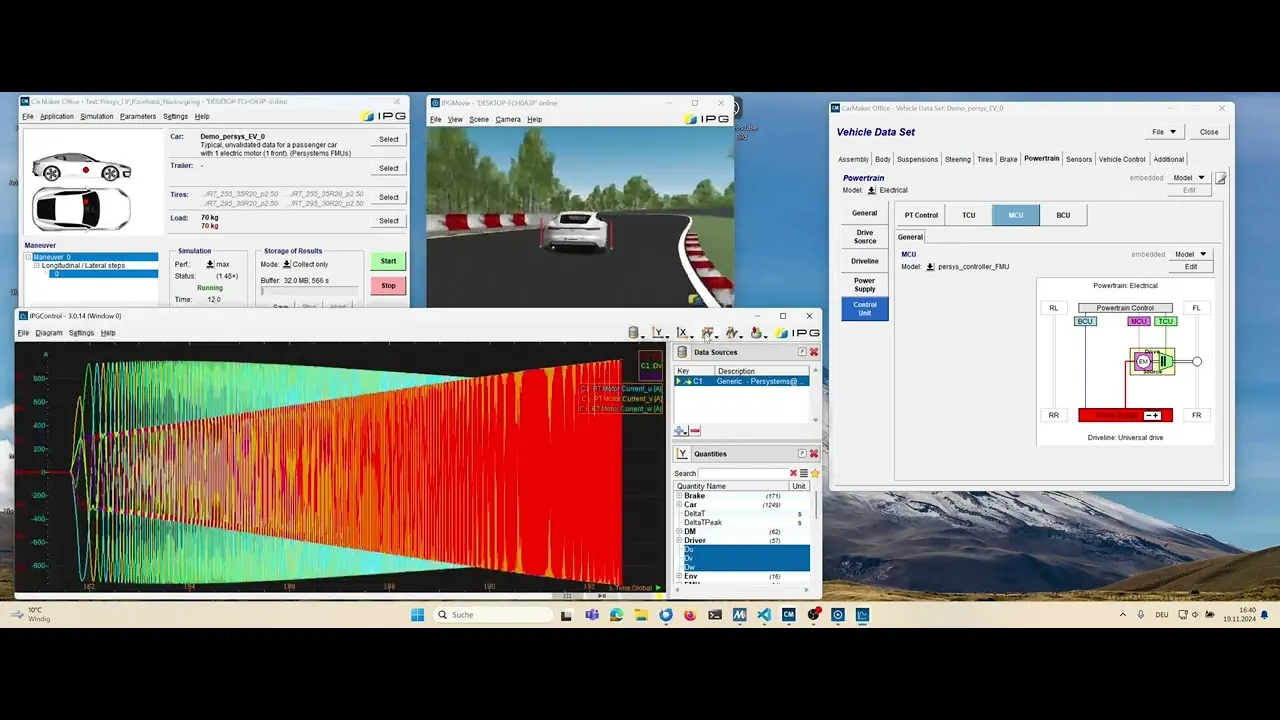
Playing the video transfers data to YouTube; nothing is loaded before that.
What the video shows
A CarMaker demo vehicle with one electric motor on the front axle. The drivetrain consists of Persystems FMUs: motor, inverter and control run as OverDrive models directly inside the CarMaker simulation. The video shows the setup, the start and the result.
The same FMU also runs unchanged in Simulink and other co-simulation environments according to the FMI standard.
Looking back
Apply & Innovate 2026 in Karlsruhe.
Persystems presented the integration of OverDrive into CarMaker at Apply & Innovate 2026, the user conference of IPG Automotive on September 16 and 17, 2026, at the Gartenhalle Karlsruhe – with a talk by Dr. Tobias Lautenschlager. Missed it? Let’s talk about your drive.
Frequently asked questions
OverDrive and CarMaker.
Do I need Simulink to use OverDrive in CarMaker?
No. OverDrive comes as an FMU according to the FMI standard and is integrated directly into CarMaker. The same FMU also runs unchanged in Simulink and other co-simulation environments.
Can I keep using my existing motor and inverter parameters?
Yes. The parameters from your existing simulations are carried over – no rebuild, no duplicate model maintenance.
How fast does the model compute?
Validation of the inverter software runs twice as fast as real time – on the development PC, without a compute cluster. Compared with conventional simulation tools, OverDrive is up to 32 times faster.
How accurate is the simulation?
OverDrive computes with structure-preserving integrators that conserve energy, momentum and charge. The results agree with LTspice, PLECS and Simulink – down to the switching ripple, as our validation shows.
What is included in the FMU?
Motor, inverter and control – as physical models with switching events and saturation, not as a lookup table. Which components the FMU contains and how it is connected to the CarMaker vehicle is agreed with you based on your use case.
Contact
See OverDrive on your own vehicle model?
Evaluation, license or integration into your CarMaker toolchain – write to us and tell us which drive you are simulating. You will get an answer straight from the engineering team.